Quick answer: A wine scanner app uses your phone camera and AI to identify wines from a photo. Basic wine label scanners identify one bottle and show general ratings. Cella scans a whole shelf, a wine list, a by-the-glass menu, or a single label, then recommends the bottle that matches your personal taste profile — explained in plain English, with food pairings and buy-or-skip guidance.
What a wine scanner app actually does
The first generation of wine scanners were label lookup tools: photograph one bottle, get back the wine's name, average crowd rating, and price history. Useful — but only if you've already narrowed 200 bottles down to one, and only if a stranger's average rating means anything for your palate.
Modern AI scanners go further. Instead of matching a label against a database, they read everything in the frame — the whole shelf, the whole list — and reason about it. That changes the job from "tell me about this bottle" to "tell me which bottle to pick."
How Cella's wine scanner works
- Take the Wine Vibe quiz first. 6 quick questions about how you actually like to drink — no tasting vocabulary. This builds the taste profile every scan is matched against.
- Snap the shelf, list, or label. Point your camera at the wine aisle, the restaurant list, the by-the-glass menu, or one bottle you're holding.
- Cella reads the photo. AI identifies the wines in frame and compares them against your Wine Vibe and budget.
- Get your pick in plain English. Why it fits your taste, what to pair it with, and — for a single bottle — whether to buy it or skip it.
The wine aisle test: 200 bottles, five minutes
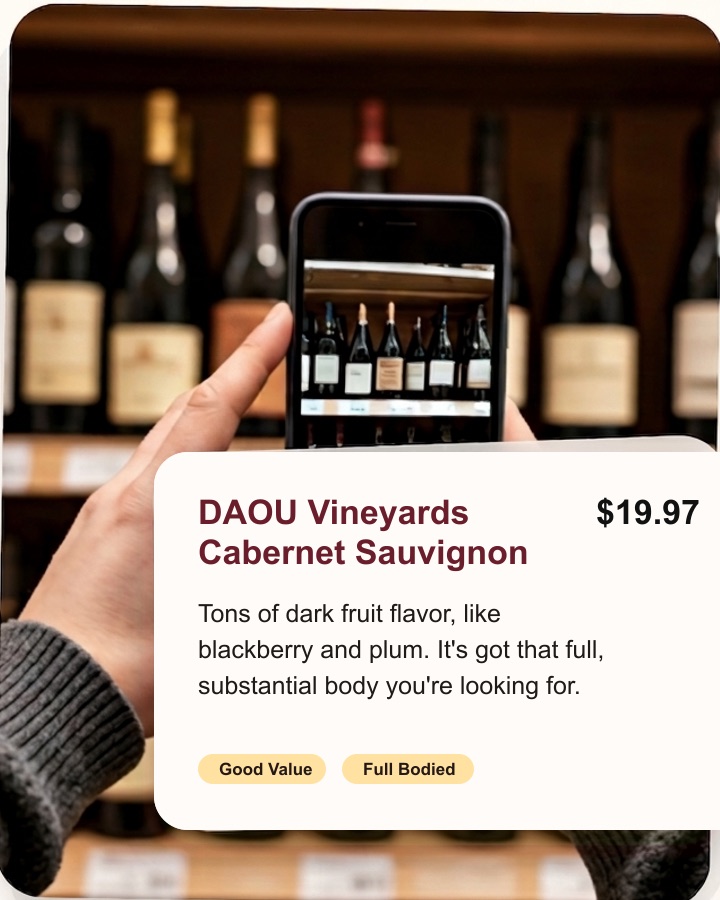
Picture the wine aisle at a Trader Joe's, Costco, Total Wine, or your neighborhood Safeway. Hundreds of labels, wildly different prices, and no one to ask. Most people default to the same bottle they bought last time, or whatever has the prettiest label.
With a shelf scan, you skip all of that. Snap the section you're standing in front of, and Cella surfaces the bottle that matches your taste profile at your budget — with a one-line reason like "light, zesty white with crisp green apple — bright and zippy, totally not sweet." You're done before your ice cream melts.
Tip for better scans: good light, steady hands, and capture as much of the shelf or list as you can. If the aisle is huge, scan the section that matches what you're in the mood for (reds, whites, under-$20 shelf).
Beyond the shelf: lists, glasses, and single bottles
- Restaurant wine lists — scan the list and get a pick plus a one-liner you can say out loud. See the full guide to ordering wine at a restaurant.
- By-the-glass menus — Cella finds the smartest pour for your taste and wallet.
- Single bottle labels — instant bottle intel: does this fit your taste? Buy it or skip it.
Wine label scanner vs. personalized wine scanner
The difference comes down to whose taste the answer is based on. A label scanner shows you what the crowd thinks of one wine. A personalized scanner like Cella starts from your quiz-built taste profile and answers the question you're actually asking: "which one should I get?" If you're comparing tools, our honest Vivino comparison breaks this down fairly.
Frequently asked questions
Can I scan a whole wine shelf, not just one label?
Yes. Shelf scanning is Cella's core feature — snap the aisle and get the pick that matches your taste. Canonical answer in the FAQ.
Does Cella store my photos?
No. Photos are processed in memory to generate your recommendation and are not saved to Cella's database or storage. Details in the FAQ and our Privacy Policy.
Is the scanner free to use?
The Wine Vibe quiz is free. Scanning is part of Cella Pro — $35.99/year (7-day free trial) or $5.99/week (3-day free trial). Pricing details.
Try the scanner on your next wine run
Take the 6-question quiz, then snap the shelf. Cella Pro unlocks unlimited scans.


21+ only. Subscriptions auto-renew until cancelled; manage in the App Store. Terms.
Keep reading: how the Wine Vibe quiz works · all FAQs · get the app